
Multi-Wallet Matrix World: How to connect to BNB Smart Chain

WORLD3
Learn how to connect your BSC wallet inside Matrix World.
Matrix World Multi-Wallet — How to Connect to BNB Smart Chain
In this article, we will cover the setup process for connecting to the BNB Smart Chain (BSC) within Matrix World. Many users will find this process familiar. Both MetaMask, which is typically used for Ethereum, and Trust Wallet, another popular multichain wallet can be easily configured to connect with BSC in Matrix World.
BNB Smart Chain joins our currently supported chains, Ethereum and Flow, becoming the third option for users to connect to. We believe that BSC, with its fast transaction times and network stability, is an excellent fit for Matrix World, particularly for developers and communities looking to integrate inside a metaverse. This integration does not impact land supply and aligns with our long-term goal of establishing Matrix World as a leading multichain metaverse. For more insights into why the team chose to integrate BSC, please read our article ‘BNB Smart Chain Comes to Matrix World!’
How to connect to BNB Smart Chain (New User):
If you’re already a Matrix World user, please refer to the ‘Existing User’ section, as the setup process differs.
Getting Started: Visit the official Matrix World website at https://matrixworld.org/. In the top right corner, click ‘Connect Wallet.’ From there, select ‘BNB Chain’ to connect using the BNB Smart Chain.
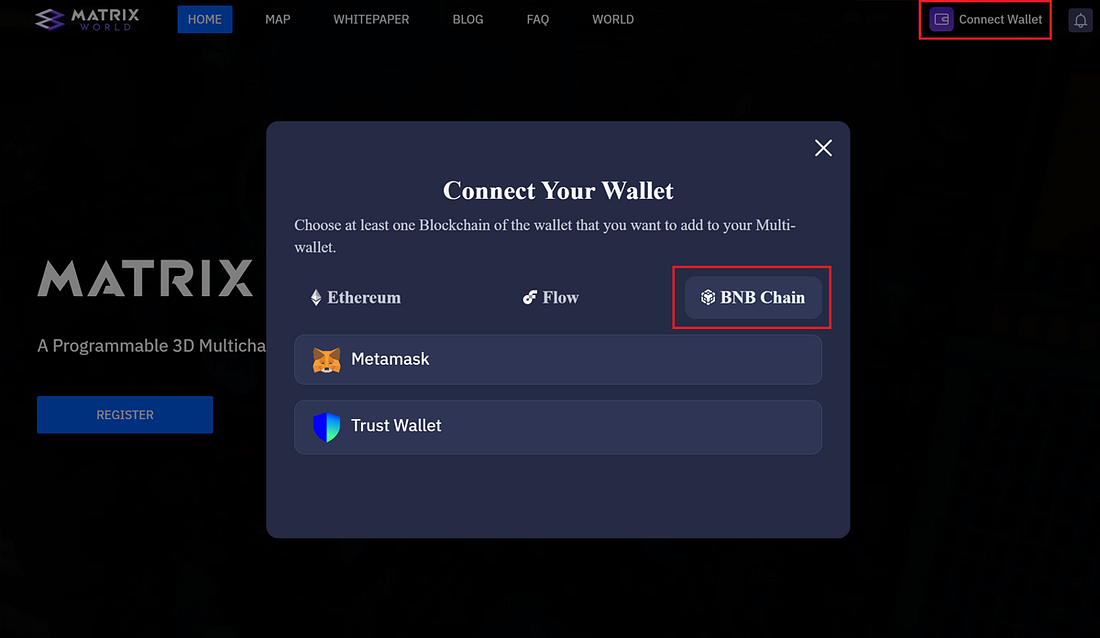
Connect Wallet Window
Choose Your Wallet: You have two wallet options to connect with: MetaMask & Trust Wallet. In the future, there are plans to integrate Blocto wallet commonly used by our Flow landowners.
- MetaMask: If you select MetaMask and have an Ethereum account, a prompt will guide you to switch to the BNB Chain network and connect to Matrix World. Your existing Ethereum address will be maintained.
Website: https://metamask.io/
Download: https://metamask.io/download/
Setup guide: https://support.metamask.io/hc/en-us/articles/360015489531 - Trust Wallet: The Trust Wallet is a commonly used multichain wallet supporting 100+ blockchains and used by over 70 million people. Much like Metamask, when connecting to the Matrix World website, you’ll be prompted to switch to the BNB Chain network and connect to Matrix World.
Website: https://trustwallet.com/
Download: https://trustwallet.com/download
Setup guide: https://trustwallet.com/blog/the-official-beginners-guide-to-trust-wallet
If this is your first time connecting, you will be guided to bind your email to the chosen account, as shown in the image below. If you have already connected to Matrix World with a wallet previously, please stop and connect with that one as you will not be able to bind an email that is already linked to another account.
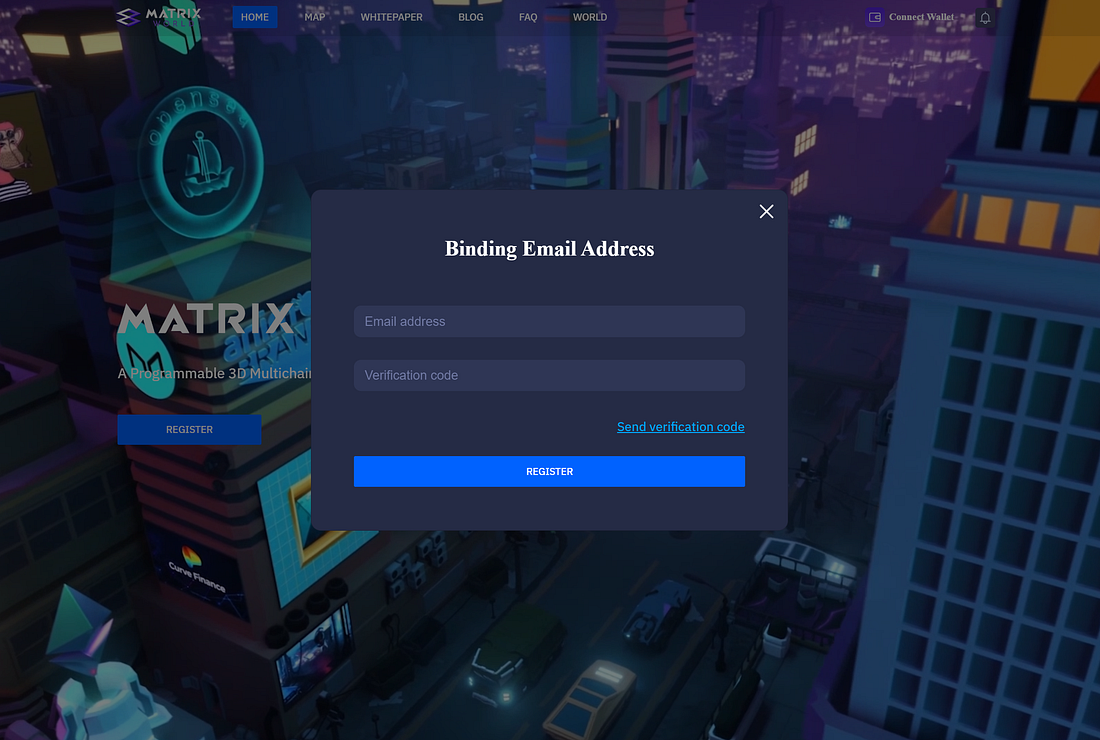
Binding Email Windo
How to connect to BNB Smart Chain (Existing User):
If you are an existing Matrix World user, you’ll need to start by using the wallet you’ve already associated with Matrix World (either ETH or FLOW).
Reconnect Your Wallet: Visit the official Matrix World website at https://matrixworld.org/ and select ‘Connect Wallet’ in the upper right corner. Ensure that you connect with the wallet previously used with Matrix World.
Add Network: Once connected, click on any of the three chain icons where the ‘Connect Wallet’ button used to be, then select ‘Add Network.’
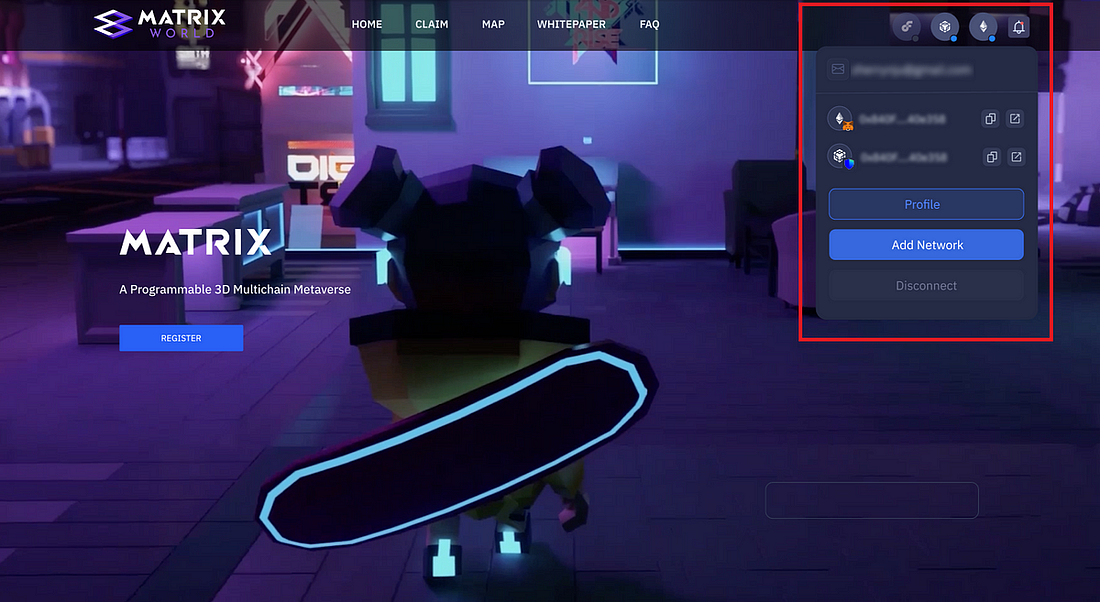
User Information
Select BNB Chain: After selecting ‘Add Network,’ the wallet connection window will display all your existing wallets, organized under their respective tabs. To connect to the BNB Chain, simply choose ‘BNB Chain’ from these options.
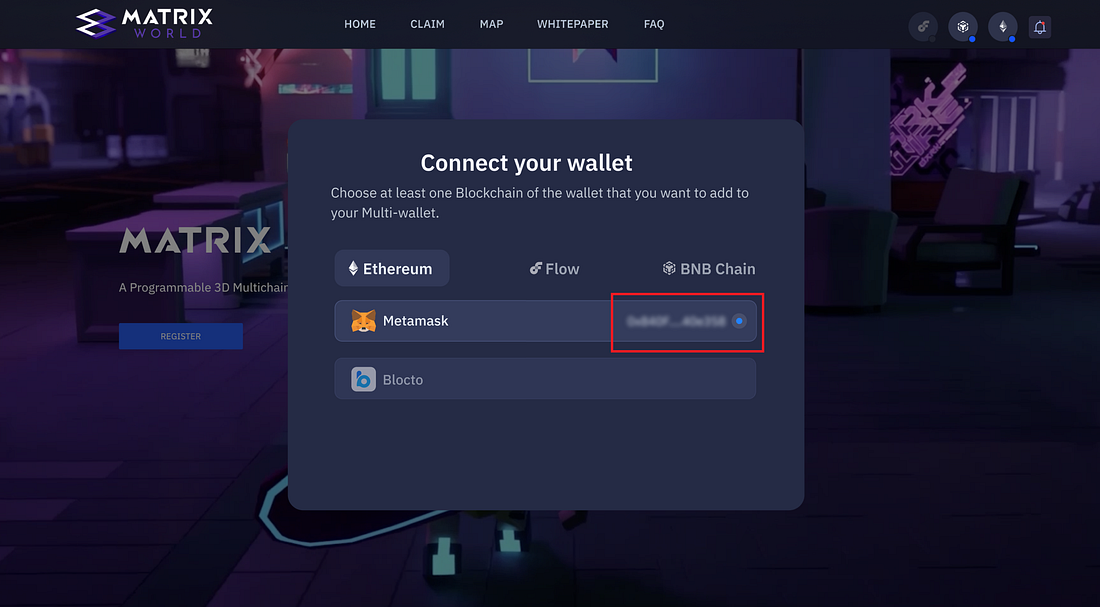
Connect Wallet Window
Choose Your Wallet: You have two wallet options to connect with: MetaMask & Trust Wallet. In the future, there are plans to integrate Blocto wallet commonly used by our Flow landowners.
- MetaMask: If you select MetaMask and have an Ethereum account, a prompt will guide you to switch to the BNB Chain network and connect to Matrix World. Your existing Ethereum address will be maintained.
Website: https://metamask.io/
Download: https://metamask.io/download/
Setup guide: https://support.metamask.io/hc/en-us/articles/360015489531 - Trust Wallet: The Trust Wallet is a commonly used multichain wallet supporting 100+ blockchains and used by over 70 million people. Much like Metamask, when connecting to the Matrix World website, you’ll be prompted to switch to the BNB Chain network and connect to Matrix World.
Website: https://trustwallet.com/
Download: https://trustwallet.com/download
Setup guide: https://trustwallet.com/blog/the-official-beginners-guide-to-trust-wallet
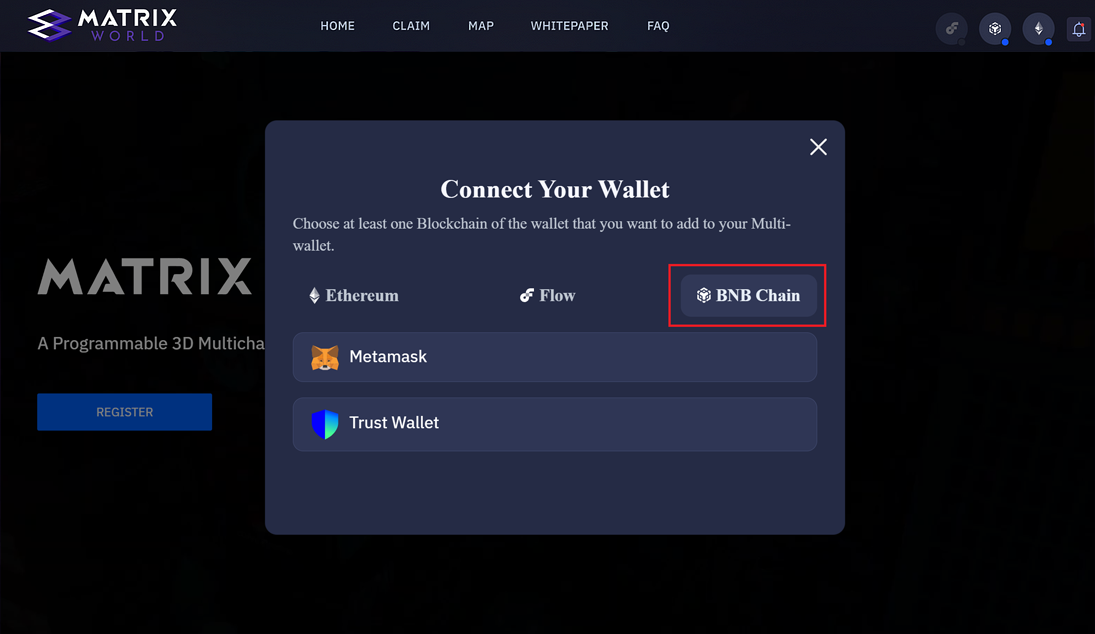
BNB Chain Options
Update Your Details: If you would like to change your email or remove wallets, clicking on any one of the three chain icons in the top right corner and then selecting ‘Profile’ will take you to your profile.
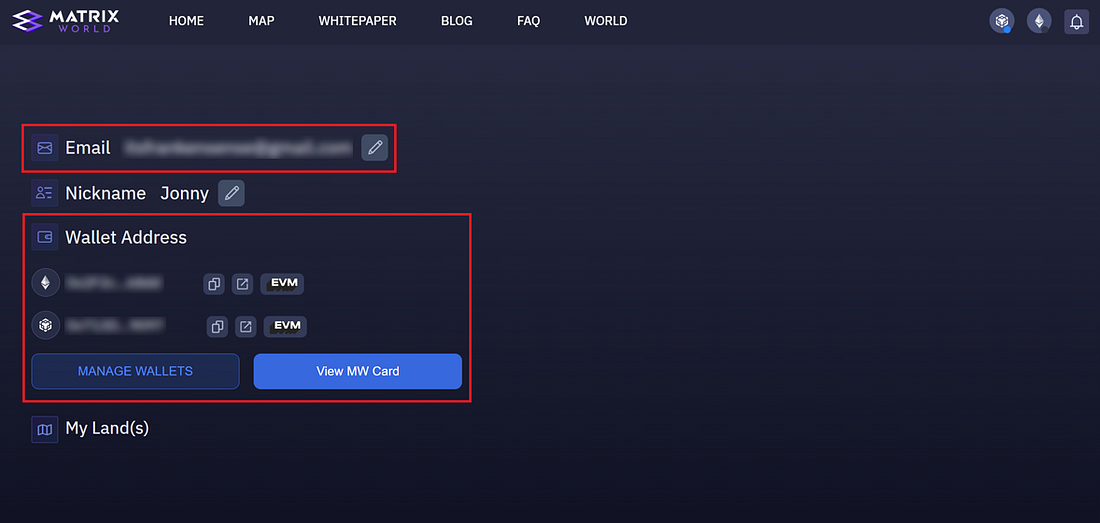
Profile Selection
It should be as easy as that! If you run into any issues connecting to Matrix World, please join our Discord server and our team would love to help out!
About Matrix World
Matrix World, established in 2021 by its parent company Matrix Labs, is its first and only multichain metaverse. Matrix World was created with accessibility in mind, not limiting developers and end-users to one blockchain. Each parcel is powered by its own computational power and storage resources providing the user complete control over what is built and the lifecycle of the objects on their land. In February of 2022, Matrix World successfully raised $5.5M from 17 investors in angel-round funding at a $50M valuation to support the growth and development of the Matrix World project.
To learn more about Matrix World or get in contact, please visit the links below: