
How to get Flow in Blocto wallet to pay for LAND(s) in Matrix World

WORLD3
Matrix World is offering 5000 Lands on FLOW blockchain and the accepted payment is FLOW through Blocto wallet, which is a Flow supported wallet.
This post will discuss all the possible ways to get FLOW in your Blocto wallet.
FLOW is a native token of Flow blockchain and it’s listed on the following Exchanges.
The FLOW Supported Exchanges:
- Kraken
Available Pairs: FLOW/USD, FLOW/EUR, FLOW/BTC, FLOW/ETH, FLOW/GBP - Gate.io
Available Pairs: FLOW/USDT - Huobi Global
Available Pairs: FLOW/USDT - OKEx
- KUCOIN
Available Pairs: FLOW/USDT, FLOW/BTC - Binance (not available for now)
Available Pairs: FLOW/USDT, FLOW/BUSD, FLOW/BTC
Method 1: Buy FLOW tokens from any of the above-mentioned Exchanges and then transfer to the Blocto wallet using Blocto wallet address that you used to apply for presale
If you’re a user of any of the above-mentioned exchanges, you can swap your tokens with FLOW tokens and then receive them on the Flow blockchain using blocto wallet. The applicants already have a wallet address that they used to apply for the presale. They need to use the same wallet address to receive the Flow tokens from any of the above-mentioned exchanges in the Blocto wallet. The address can be found by logging into the Matrix World website as shown in the figure below.
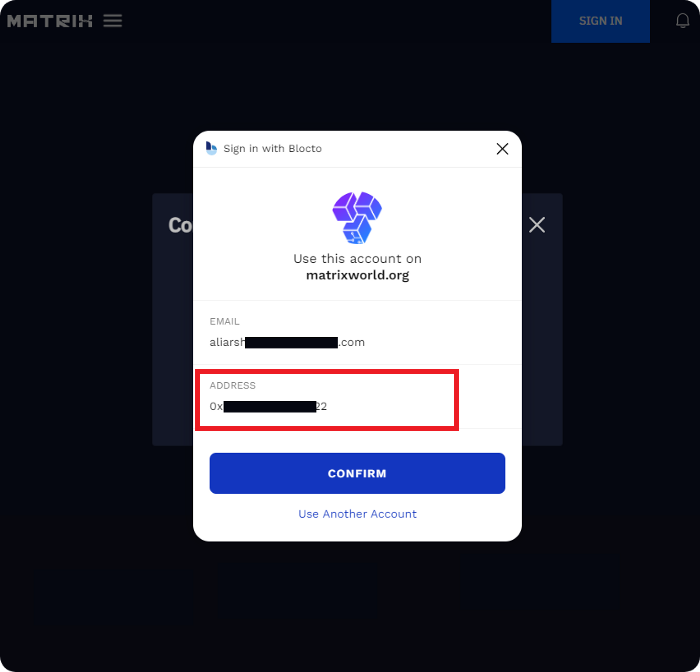
The next step is to go to any of the above-mentioned exchanges and withdraw the Flow token to the address that you used for the presale application.
For better understanding, we’ll elaborate how to receive FLOW tokens from the Karaken exchange to the Blocto wallet
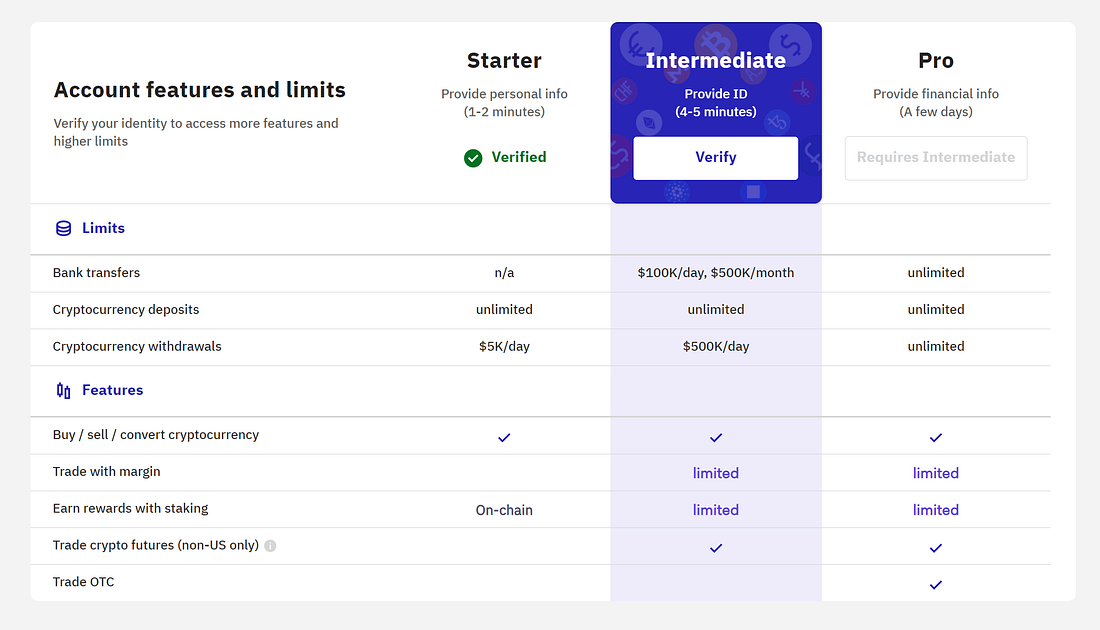
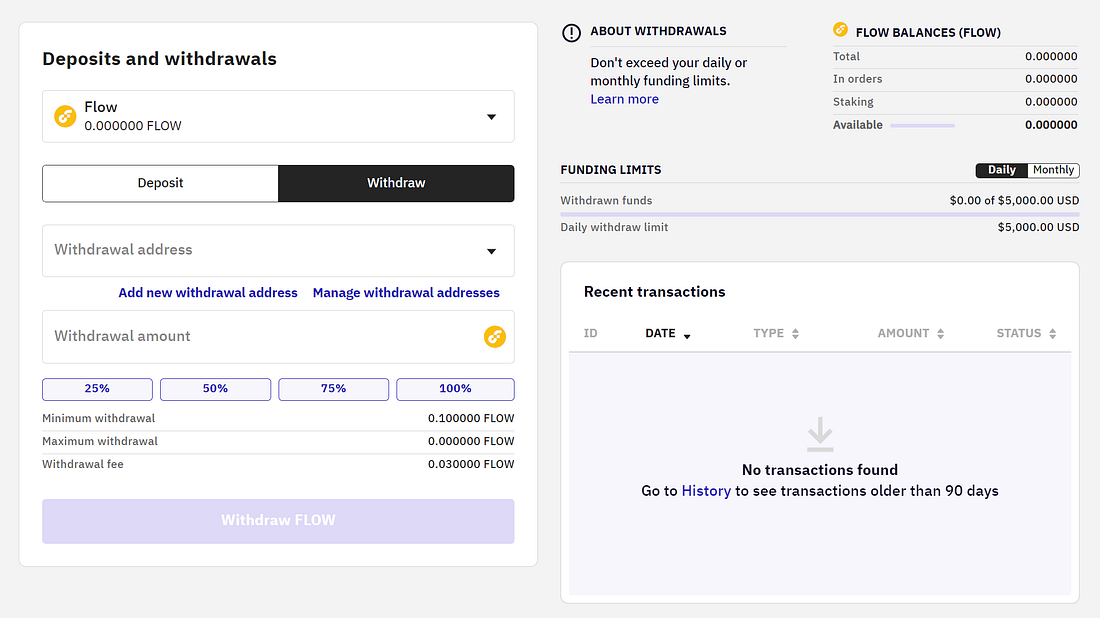
If you have any tokens in your Binance, Kraken, Gate.io, Huobi Global Exchange, you need to swap them into USDT, for Kraken users, you need to complete the Intermediate verify so that you can deposit cash into your Kraken account. You can swap Flow with USD dollar, Euro, Ethereum or BTC etc. The next step is to withdraw your Flow from Kraken to Blocto wallet. So, you’ll have the FLOW in your wallet now. On other Exchanges, if you don’t have any cryptocurrency in your wallet, you can simply buy from peer to peer using your local currency, such as USD to USDT.
Method 2: Buy FLOW tokens directly from Blocto wallet using a third-party (MoonPay) payment service
The Blocto wallet lets users directly buy cryptocurrencies using a third-party payment service called MoonPay. For that, you need need to log in to the Blocto mobile application using the same email and wallet address that you used to apply for the presale. And then click on the buy icon, select the desired cryptocurrency, and the payment currency such as US Dollar ($), New Taiwan Dollar (NT$), Japanese Yen (¥), etc. Once you have filled in this information, you’ll be prompted to fill in some basic information such as name, address, country, and you’ll have to verify your identity using the required documents such as a driving license or national id card. The last step is to fill in the card information to make payment. The amount in your chosen currency unit will be deducted from your ATM card and the cryptocurrency i.e., FLOW tokens would be received in your Blocto wallet. And after that, you can use FLOW tokens to pay for the LAND(S).
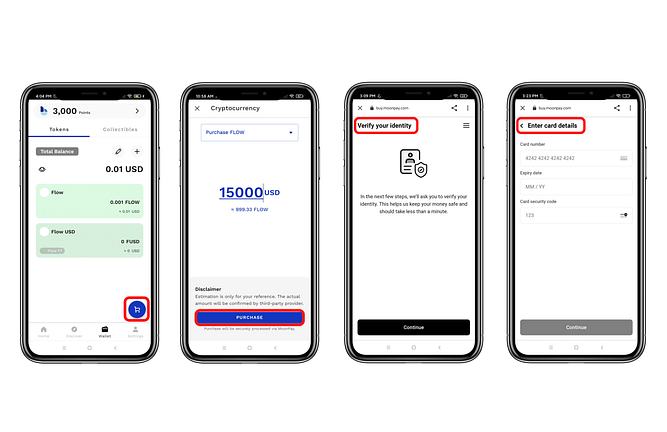
3. The description on how to buy FLOW using Blocto Wallet
Method 3: Use BloctoSwap, a Decentralized Exchange
If you have USDT on Ethereum, BSC, or Solana, you can convert them to tUSDT using BloctoSwap and receive on Flow blockchain in Blocto wallet. For that you need to follow the below-mentioned steps.
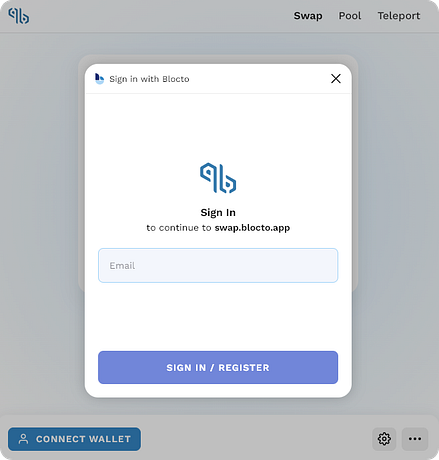
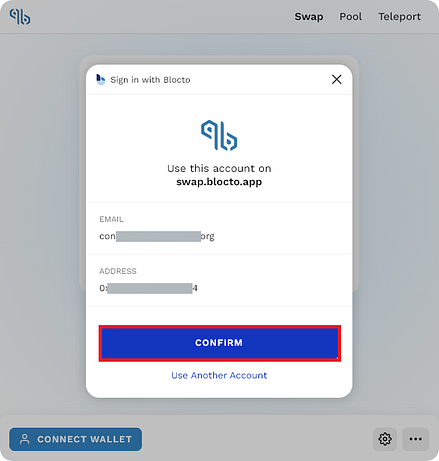
**Step 1: Connect your Blocto wallet to BloctoSwap
**Use the same e-mail address that you used to apply for the Land presale to log in the Blocto wallet. Once you are logged in, click confirm.
Step 2: Connect other blockchain wallet such as Ethereum, BSC, Solana
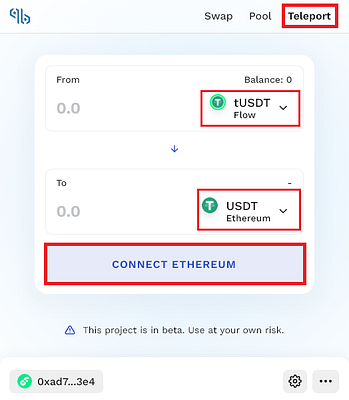
After connecting the Blocto wallet, choose Teleport to transfer your USDT from Ethereum, Binance Smart Chain, or Solana to tUSDT on Flow blockchain.
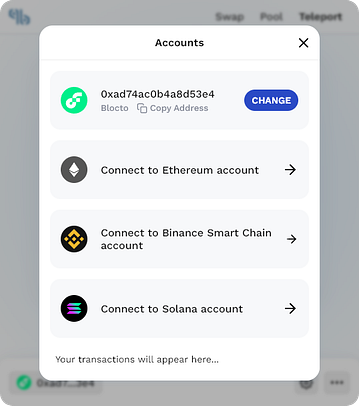
**Step 3: Select Teleport bridge to transfer assets from one blockchain to another such as from Ethereum to Flow
**Below-mentioned are the Ethereum supported wallets, you can use these wallets to connect with the BloctoSwap and then transfer your USDT from Ethereum blockchain to tUSDT on Flow blockchain.
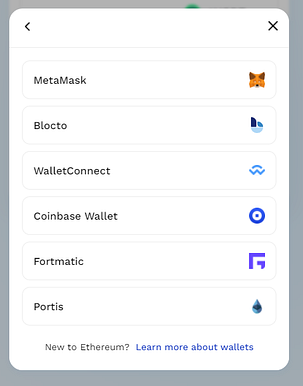
The Teleport is actually a bridge that lets users transfer their assets from one blockchain to another. Such as USDT from Ethereum to tUSDT on Flow blockchain, USDT from Solana to tUSDT on Flow blockchain, and USDT from Binance Smart Chain to tUSDT on Flow blockchain.
**Step 3: Swap tUSDT to FLOW using Swap
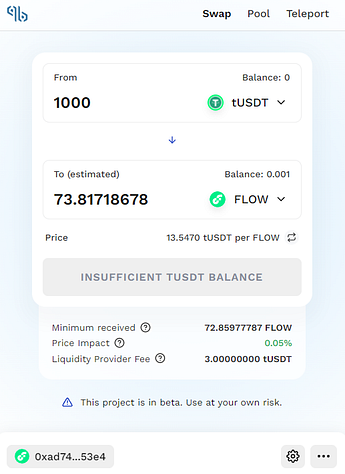
**Once the tUSDT is received in the blocto wallet, the users need to use the swap function on BloctoSwap to convert tUSDT in Flow as shown in the figure below. And finally they can use FLOW through Blocto wallet and pay for the Land(s).
Thanks for your interest in Matrix World. If you have any questions, please join us at any of the below-mentioned channels:
Telegram-EN: https://t.me/joinchat/26ov1EJ6Ln82MjI1
Telegram-CN: https://t.me/matrixchinese
Twitter: https://twitter.com/theMatrixWorld
Discord: https://discord.gg/bMQh4ztyhP